

Preset
How to tutorial
A presenter walks through how to use your product in three to five real steps, talking to camera with both hands on the product.
- Best for
- Product how to videos, first use guides, onboarding clips, help centre and TikTok tutorials
- Output
- Video
- Time
- 3 to 6 min
- Credits
- 195 credits for the 15 second default, 130 for 10 seconds est.
Already have an account? Sign in
350 free credits when you create an account, no card required. You land right in NOLGIA Agent, on this preset's questions, ready to run.
How to use it
NOLGIA Agent asks these questions in a chat, one at a time, with your own material.
Product photosOptional
Add up to four photos from your device or your Library. Clear photos of the product being shown. It appears exactly as shown. You can skip this if you describe it below.
What is the product?
Write it in your own words. Name it, what it is made of and roughly how big it is.
For example: A matte white milk frother with one silver button, about 20 cm tall
The steps
Write it in your own words. Three to five real steps, one short line each, in order. The presenter does exactly these, nothing made up.
For example: 1. Fill the jug to the line
Who is on camera?Optional
Pick one. Pick a stock presenter and they look the same in every take. Or use one of your own characters. Skip it and we cast someone.
- Zara Okonkwo
- Lena Marchetti
- Yuki Hasegawa
- Camila Reyes
- Sofia Lindqvist
- Priya Nair
- and 7 more
Who is on camera?Optional
Pick one of your characters. Only if you picked Use my character above: choose the saved character who is on camera.
Where is it filmed?Optional
Pick one. The room or place the presenter is in. Skip it and we choose.
- Kitchen
- Bathroom
- Bedroom
- Living room
- Home office
- Parked car
- and 2 more
How long?Optional
Pick one. One continuous clip. Keep it to three steps for 10 seconds.
- 10 seconds
- 15 seconds
Create
One press of Create makes your video and saves it to your Library. The price is on the button, and nothing runs until you press it. It takes 3 to 6 min.
About this preset
Show people how to use it. A presenter holds up your product, says here is how to use this, and walks through your real steps one clear hand action at a time, naming each step out loud, then ends on the result. Pick one of twelve stock presenters so the same person fronts every video, or use your own character. Choose where it is filmed, from a kitchen counter to a parked car. Your product photos ride as references so the product looks exactly right, and the presenter does exactly the steps you write, nothing made up. It is shot like phone footage in plain daylight, vertical, with the presenter's real voice. It runs on MiniMax H3, the lane that holds a face and a voice together, and one clip holds up to five steps in 15 seconds.
Use cases
- First use guides for a product page
- TikTok and Reels how to clips that sell by showing
- Help centre and onboarding videos
- Setup walkthroughs for gadgets and kitchen tools
- Recipe and routine steps with a product
Examples
Made with this preset, with the prompt behind each one.
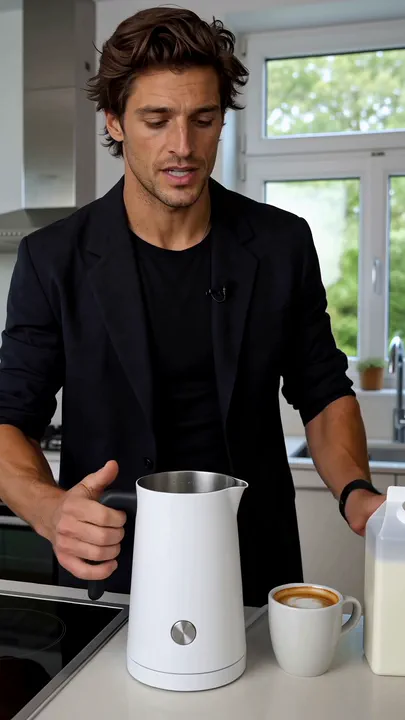
Milk frother how to, 15 seconds vertical: Theo pours the milk, presses the button and tips the foam over a fresh coffee
UGC iPhone aesthetic, filmed in the place described under THE SETTING below, soft neutral daylight, photoreal, the phone propped at chest height in a locked-off vertical frame so both of the presenter's hands are free. A short how to tutorial in which the presenter shows the viewer how to use one product, step by step. The clip opens ALREADY MID MOMENT with the presenter holding the product up to the lens, the first word landing on the very first frame, saying clearly: Here is how to use this. Then the presenter works through the steps listed under THE STEPS below, in order, one clear hand action per step, the hands and the product always in frame and in focus, naming each step out loud in a few plain words as it happens, the result of each step visible before the next begins. It ends on the finished cup held up to the lens, the presenter smiling and saying: And that is it. Exactly one product, with realistic weight and scale in the presenter's hands. Natural room audio, the presenter's real voice, no music. No on-screen text, no captions, no watermark, no brand logos, no beauty filter, no cinematic grade, no extra hands. The presenter's skin shows visible fine texture with natural pores and subtle asymmetries, slightly uneven natural makeup, matte to natural complexion, no beauty filter, no digital smoothing, naturally muted catchlights in the eyes, never glowing irises. THE PRESENTER (@Image1): Theo Laurent, a 33 year old French man with light skin and a faint tan, a long face with a strong chin, light stubble, green grey eyes, a slightly crooked nose, a cool unbothered expression; tousled medium brown hair with day two texture pushed back off the forehead; lean rangy build, 6 foot 2. Matches @Image1 exactly. THE STEPS: pour cold milk into the jug up to the line, press the button once and wait for the foam, then pour the foam over a fresh coffee. THE SETTING: a bright modern kitchen, the presenter standing at the counter with the product on the worktop in front of them. THE PRODUCT (@Image2): a matte white countertop electric milk frother, about 20 cm tall, a tapered cylindrical jug with a small pouring lip, a slim black silicone handle, a soft domed lid and a single round brushed silver button on the front, standing on a matching low circular base, completely unbranded with no lettering of any kind. Matches @Image2 exactly; do not redesign, restyle, recolor or reinterpret it.
Suggest directions for me
Say what you are making it for and NOLGIA suggests a few directions for How to tutorial, each with a prompt and the options it sets. Nothing is generated until you use one.
Models it uses
The model NOLGIA Agent reaches for on this preset. Sign in to see live credit costs and capabilities from the model catalog.
Hailuo 3
video- Credits per generation
- 65 credits per 5s clip
Ready to make a How to tutorial?
A few quick questions in the chat, your own material, and NOLGIA makes it.