

Preset
Miroge: recast your clip
Keep the motion, change everything else. Recast a clip you already have with your own people, pets or characters, swap one thing in it, or move it to a new place. The moves, the timing and the camera carry over from your clip.
- Best for
- Putting yourself, a character or your pet into a clip, swapping a product or prop without a reshoot, moving a shot to a new place
- Output
- Video
- Time
- A few minutes
- Credits
- Priced on the Generate button
Already have an account? Sign in
350 free credits when you create an account, no card required. You land right in the Miroge composer, ready to run.
How to use it
In the Agent, these are the questions NOLGIA asks, one at a time. The Miroge composer puts it all on one screen.
Your clip
Add one video from your device or your Library. One clip of 3 to 10 seconds and up to 14 MB. It comes back the same length, framing and cut, with one thing changed.
What should change?
Write it in your own words. The one object or product to replace, and where it is in the shot.
For example: The white coffee mug on the desk
What it becomes
Write it in your own words. Describe the new object with its material, colour and shape, so it comes out exactly as you picture it.
For example: A matte black steel travel bottle with a bamboo lid
Create
One press of Create makes your video and saves it to your Library. The price is on the button, and nothing runs until you press it. It takes a few minutes.
About this preset
Miroge takes a clip you already have and recasts it. The moves, the timing and the camera come from your clip, and what is in it comes from you. Open the Miroge composer, pick one of three modes, add the clip and your photos, and press Generate.
Motion transfer. Your cast performs the clip. Add one photo for each performer, a person, a pet or a character from your Characters library, and they take over the moves, the set and the camera of the original. It runs on Seedance 2.5 by default, with up to nine photos.
Swap. Change one thing and keep the rest of the shot: a person, an animal, a product or an outfit becomes the one in your photo, or the one you describe. It runs on Seedance 2.5 by default.
New world. Keep the subject and its moves, and redraw the place and the light around it. Name what must stay first, in plain physical detail, then what changes. It runs on Gemini Omni 1.1 Edit.
The prompt is optional in Motion transfer: with no words, Miroge replaces the people in the clip with the subjects in your photos. Type @ to point at the clip or a photo, and See what gets sent shows the whole instruction before you generate.
The composer shows the clip lengths, sizes and photo counts the chosen model accepts, and stops a clip that will not run before anything is charged. The price for your clip, model and quality is on the Generate button, and one click runs it. If the model refuses a clip, the credits come back. The result appears next to the form and in your Library, with Recreate, Compare and Download.
Use footage you shot or made yourself, because clips of well known people and copyrighted material are refused. Our guide Put your own character and your dog into any video walks through Motion transfer step by step, with the files to try it yourself.
Use cases
- Putting yourself, a friend or your dog into a clip with the moves you want
- Recasting a dance, a performance or a skit with your own characters
- Swapping a pet, a product, a prop or an outfit without a reshoot
- Trying a new product in a shot you already filmed
- Moving a hands-on or product shot to a new place
Examples
Made with this preset, with the prompt behind each one. Use this example opens the Miroge composer with that example's own files and settings loaded. Nothing runs until you press Generate.
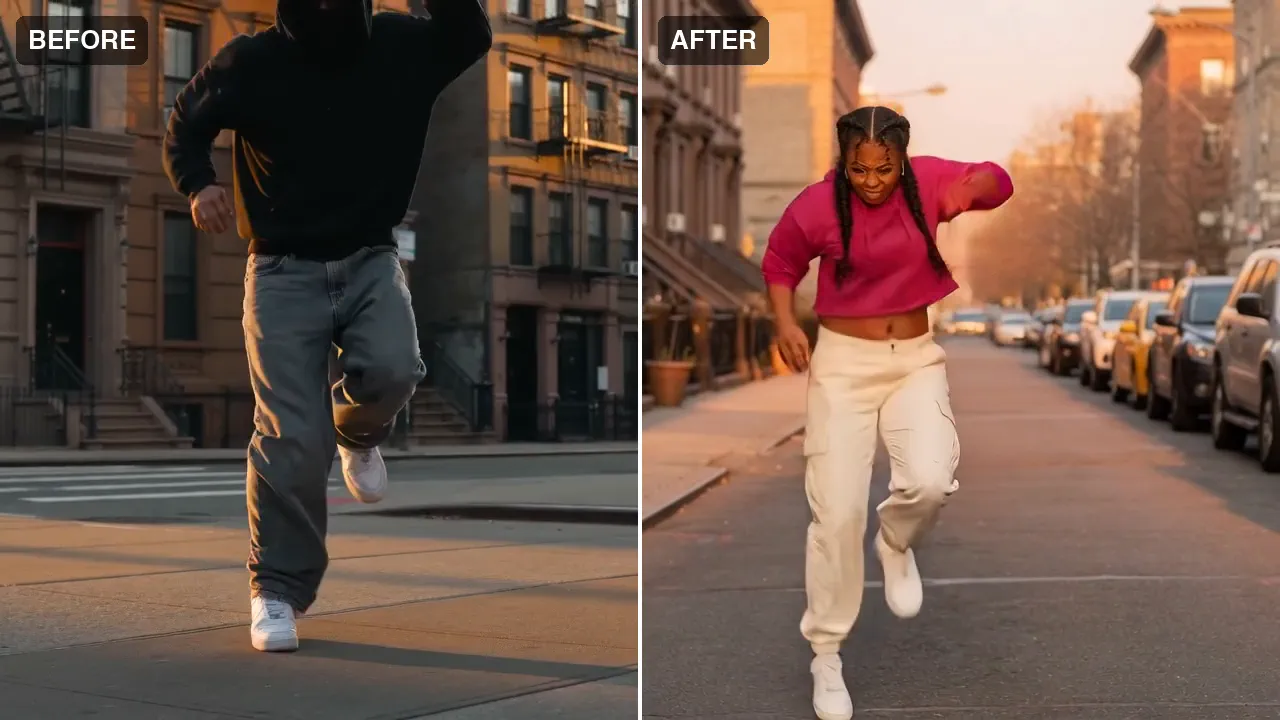
Before and after, side by side: a hooded dancer's hip-hop routine on a New York street, re-performed by a different dancer. Same choreography, beat for beat, and the new performer's braids, magenta hoodie and cargo pants carry through every move.
@Video1 provides the exact motion, choreography, timing and camera movement: reproduce every move frame for frame. The performer is @Image1, the young woman hip-hop dancer in the magenta cropped hoodie with braided hair, dancing in the same New York street at golden hour. Keep her hair and clothes exactly as they are in @Image1 throughout. Do not change the motion, the timing or the camera; change only who is performing. Photorealistic, no on-screen text, no signage, no logos.
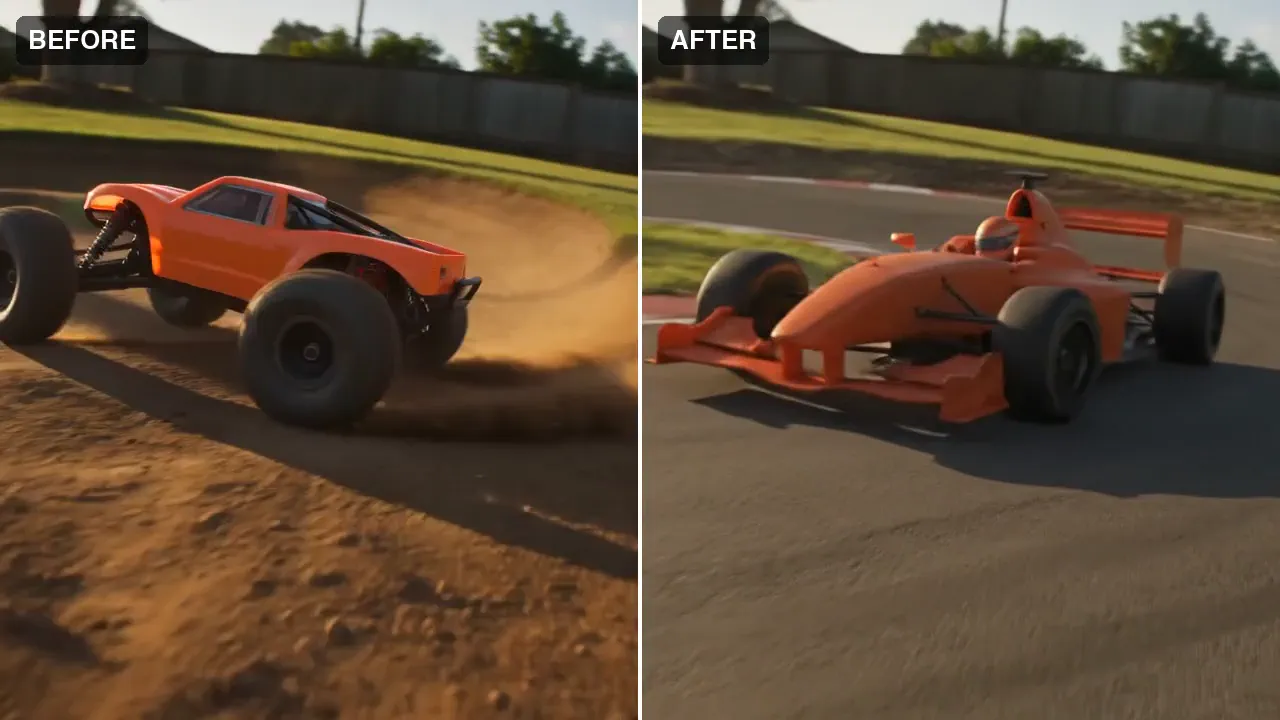
Before and after, side by side: a backyard RC buggy becomes a full-scale open-wheel race car on a real circuit. Same corner, same line, same camera move.
Edit this clip and change one thing only. THE TARGET: the small matte orange toy radio-controlled buggy drifting round the dirt corner. THE NEW OBJECT: a full-scale invented single-seat open-wheel race car in plain matte orange with a simple blade rear wing and bare black slick tyres, an anonymous unbranded prototype with no badges and no decals, at real car scale on a real asphalt race circuit with red-and-white kerbs. Replace the target with the new object at the same position and scale, moving exactly as the target moved, with matching shadows and reflections. Keep everything else the same: the same background, the same camera move, framing and cuts, the same lighting and colour, nothing else added or removed. No on-screen text, no watermark, no brand names, no badges, no logos, no sponsor decals, no trademarked or recognisable production designs - the new object must be an invented, generic shape.
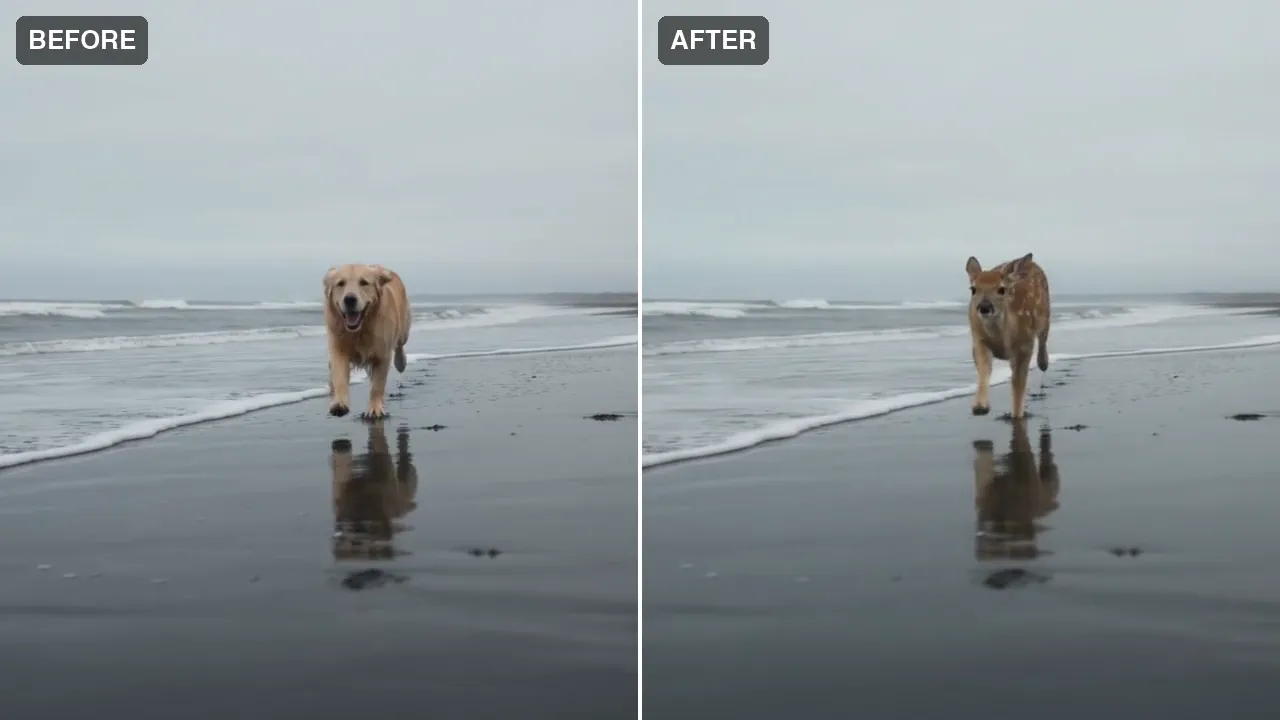
Before and after, side by side: a retriever running the wet sand becomes a spotted fawn. Same stride, same waves, same overcast light.
Edit this clip and change one thing only. THE TARGET: the golden retriever running along the wet beach toward the camera. THE NEW OBJECT: a young spotted fawn with reddish-brown fur, white spots and slender legs. Replace the target with the new object at the same position and scale, moving exactly as the target moved, with matching shadows and reflections. Keep everything else the same: the same background, the same camera move, framing and cuts, the same lighting and colour, nothing else added or removed. No on-screen text, no watermark, no brand names, no badges, no logos, no sponsor decals, no trademarked or recognisable production designs - the new object must be an invented, generic shape.
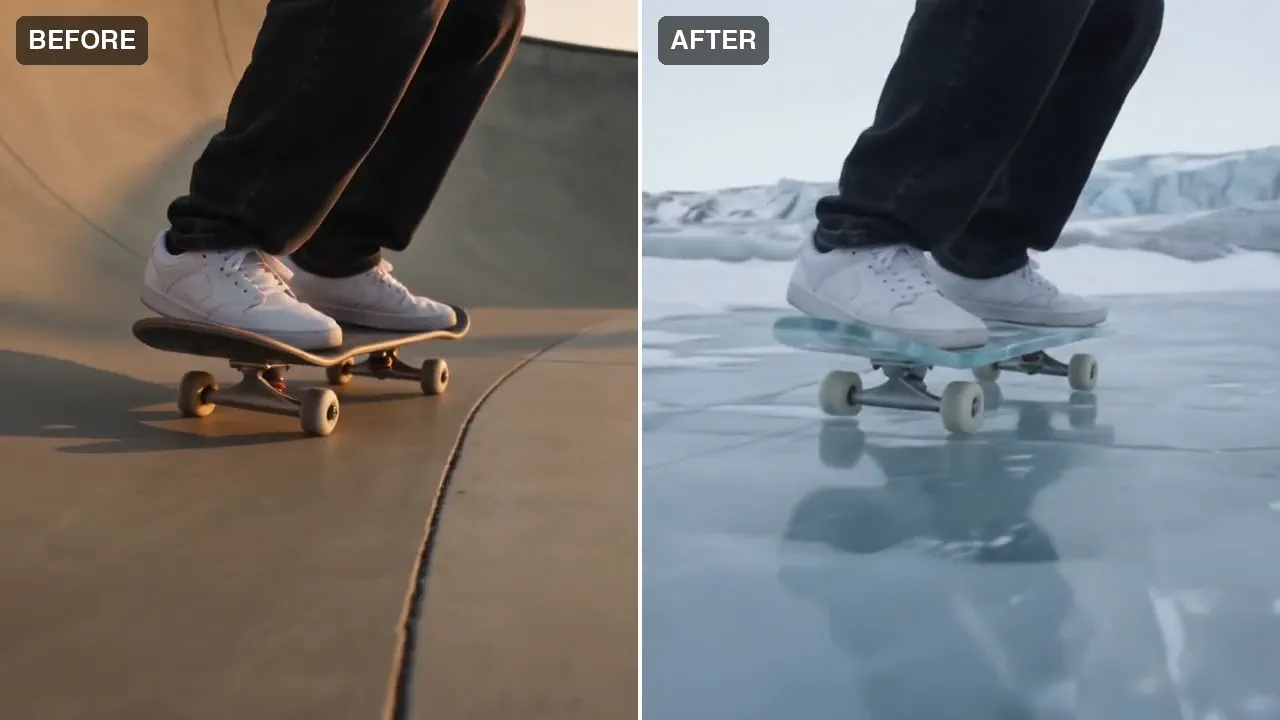
Before and after, side by side: a concrete skate bowl becomes an arctic glacier and the board becomes carved blue ice. Same rider, same trick, same timing.
Edit this clip and change the board and the world around it, but not the rider. KEEP THE RIDER EXACTLY AS THEY ARE: the same legs, the same black jeans, the same white sneakers, standing the same way on the board, performing exactly the same trick with exactly the same timing, the same body position frame for frame. Do not change the rider, their clothes, their stance or their movement in any way. Keep the same camera move, the same low tracking angle, the same framing and cuts, the same length. THE FIRST CHANGE: the skateboard under the rider's sneakers becomes a board of clear carved blue glacier ice, frosted and translucent, with pale icy wheels. THE SECOND CHANGE: the smooth concrete skatepark bowl becomes a curved bowl of polished glacier ice on an arctic glacier, walls of blue-white ice, drifting snow, pale cold daylight and a distant ridge of ice under an overcast polar sky. The warm golden light becomes cold blue-white light. No on-screen text, no watermark, no brand names, no logos.
Suggest directions for me
Say what you are making it for and NOLGIA suggests a few directions for Miroge: recast your clip, each with a prompt and the options it sets. Nothing is generated until you use one.
Models it uses
The models NOLGIA Agent reaches for on this preset, in order of preference. Sign in to see live credit costs and capabilities from the model catalog.
Seedance 2.5
video- Credits per generation
- 56 credits per 5s clip
Runs inside the Miroge composer.
Gemini Omni 1.1
video- Credits per generation
- 50 credits per 5s clip
Runs inside the Miroge composer.
Ready to make a Miroge: recast your clip?
Create an account and you land in the Miroge composer.